
Reporting
The report is the deliverable.
Nobody buys a measurement. They buy the ability to show someone else that the measurement was taken properly. Measuret prints one A4 portrait sheet, in Excel and in PDF, containing the evidence for that.
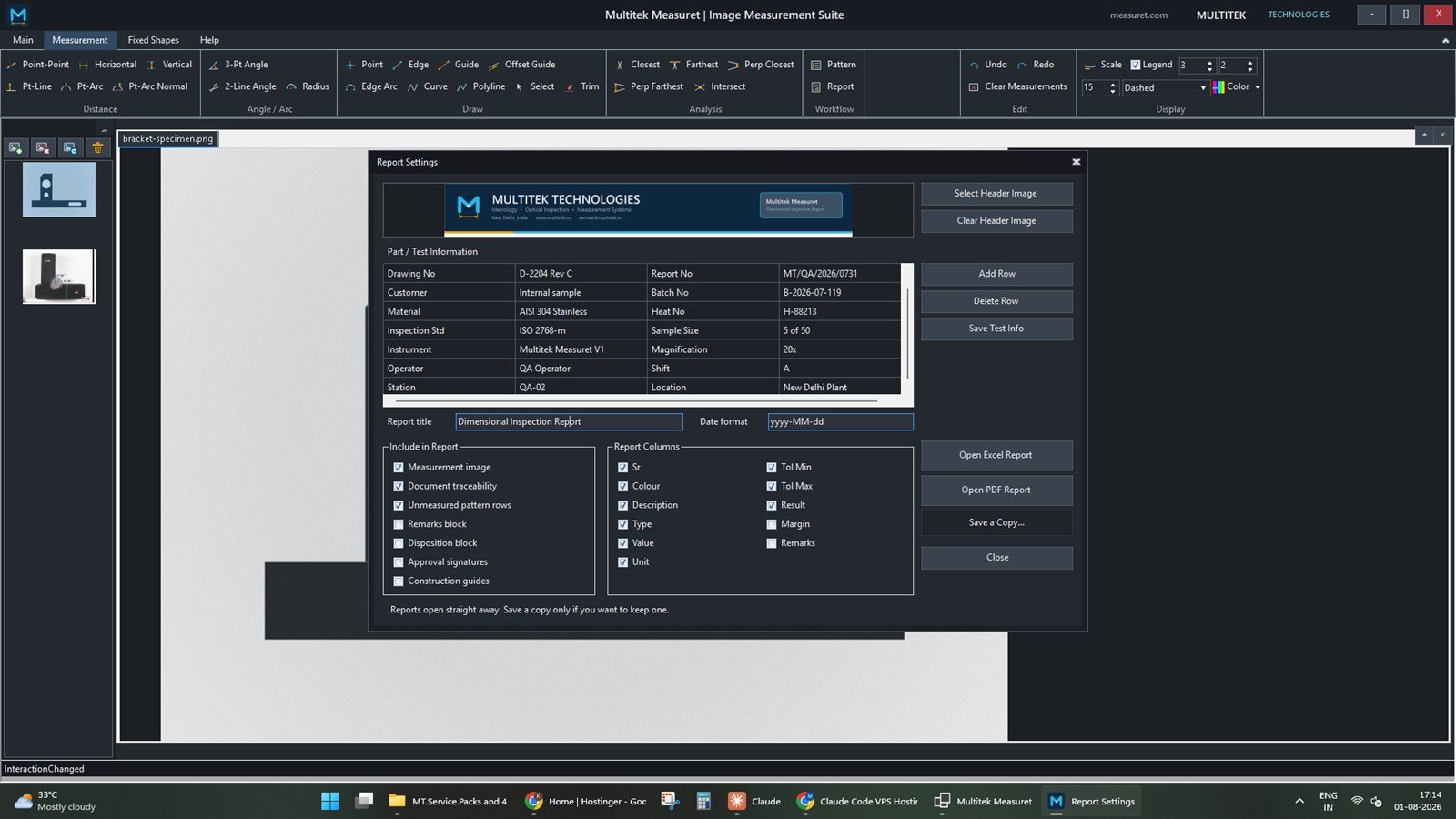
What is on the sheet
Four blocks, in one order.
The layout is fixed so that two reports from two operators are comparable at a glance. What you choose is the content of each block.
Your header image at the top of the page. Point it at your own artwork, or clear it and print without one.
A four-column grid of whatever your quality system needs to see: part name and number, drawing number, report number, batch, material, inspection standard, sample size, instrument, magnification, operator, shift. Add and delete rows to match your own paperwork, and save the set so the next report starts from it.
At full printable content width, with the overlays composed at the source image's own resolution. Stroke widths and label sizes are scaled to match what you saw on screen, so the printed evidence is not a distorted version of the measurement you took.
One row per measurement, in the columns you selected, with failing rows printed bold and red.
Columns
Eleven to choose from.
Excel and PDF read the same column policy, so the two formats cannot drift apart. At least one column must stay switched on.
| Column | Contains |
|---|---|
| Sr | Row number. |
| Colour | The overlay colour for that measurement, painted as a cell fill rather than written as text — so the table and the image match by eye. |
| Description | The pattern row description, or the tool name if there is no pattern. |
| Type | Linear, Angular or Radius. |
| Value | The measured value. |
| Unit | The calibrated unit the value is in. |
| Tol Min / Tol Max | The inclusive limits from the pattern row. |
| Result | Pass, Fail, Indeterminate or Not specified. |
| Margin | How much room was left before the nearest limit. |
| Remarks | Free text. |
Optional blocks
- Measurement image — include or omit the picture
- Document traceability — the provenance line for the document itself
- Unmeasured pattern rows — print rows nobody measured, marked Not measured, or drop them
- Remarks, disposition and approval signature blocks
- Construction guides — off by default on the printed sheet, because a report is often cleaner without the witness lines
Verdicts
Four states, and none of them lie.
A result column that only said Pass or Fail would have to invent an answer for rows that cannot honestly be judged. Measuret does not.
| Result | Means |
|---|---|
| Pass | Measured, and inside the limits. |
| Fail | Measured, and outside the limits. Printed bold red. |
| Indeterminate | Measured but untoleranced, or never measured at all. |
| Not specified | No tolerance was ever declared for this row. |
Delivery
It opens, then you decide.
Measuret writes the report and hands it straight to the shell — it does not ask you for a filename first. An operator cannot judge a report before seeing it, so choosing where to file it before it exists is the wrong order.
If the previous report is still open in Excel, the next one gets a numbered suffix rather than failing to write. The settings dialog stays open, so you can change the columns and regenerate. Save a Copy… puts it wherever you want once you have looked at it.
Exporting a report never changes or clears anything on the image.
Also available
Export the canvas as a PNG exactly as seen, overlays and construction guides included — useful when you need the picture in an email rather than a formal sheet.
Reports
Want to see one?
Ask us for a sample report and we will send a PDF produced by the software, so you can check it against what your quality system expects.